Debug in docker container#
Purpose#
To debug and modify the application code in a docker container on an ACS Edge Server, you can use Visual Studio Code along with its remote development extension.
Compatibility#
SmarTest 8 / Nexus 3.1.0 / Edge 3.4.0
Prerequisites#
You need to request access to the ACS Container Hub, and create your own user account and project.
Create VMs#
We need 3 VMs as follows:
Host Controller:
Runs SmarTest and Nexus
Edge Server:
Runs the image that contains DPAT app
Ubuntu Server:
Runs VSCode IDE
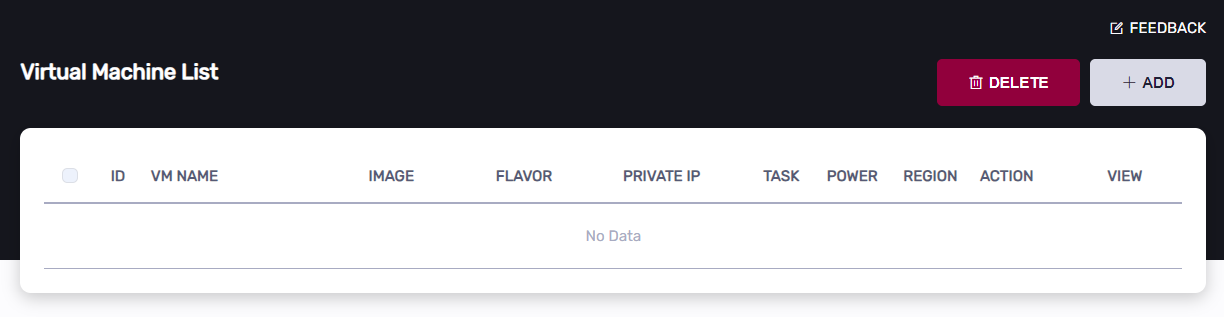
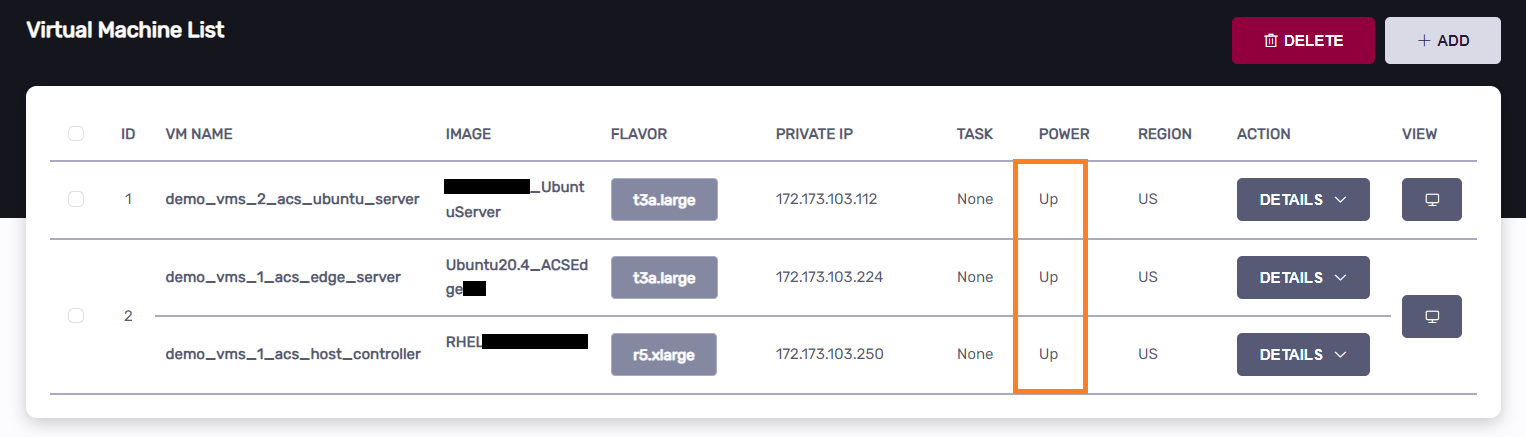
Click the “Add” button to add VMs:
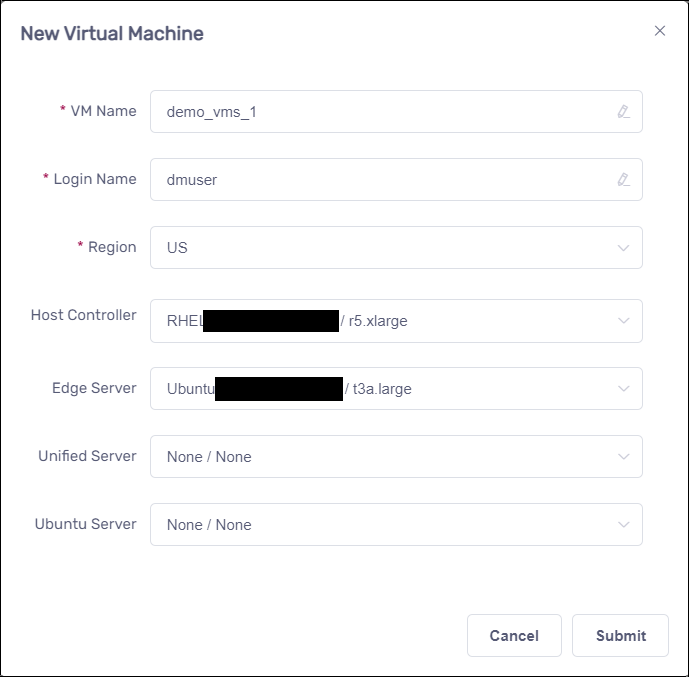
Create Host Controller and Edge Server#
Create Ubuntu Server#
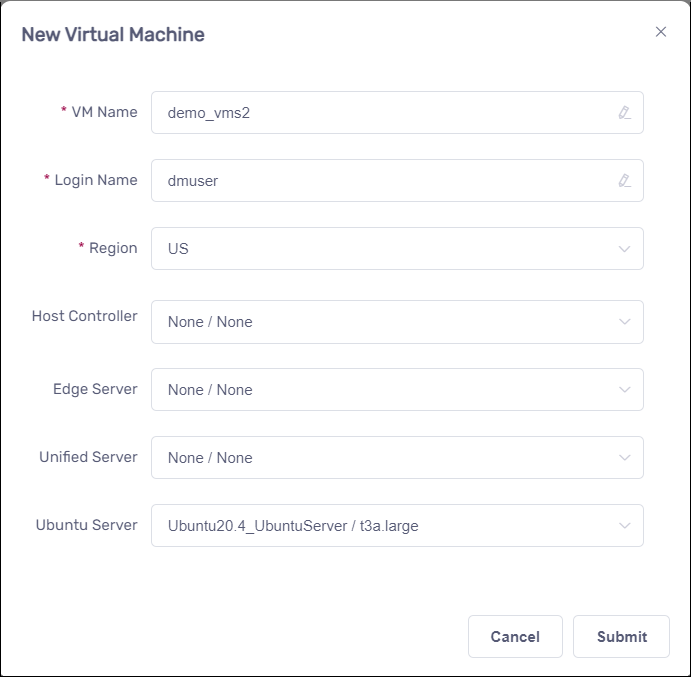
The following screenshot is for your reference;
Debug docker container procedures#
Note: The ‘adv-dpat’ project we are using below is for demonstration purposes. You will need to replace it with your own project accordingly.
From Ubuntu Server, rebuild DPAT docker image#
Download the artifacts and open them in VSCode
Note that: you need to install the same version of ACS Nexus corresponding with oneAPI’s version.
Please enter the Ubuntu Server and open a terminal:
cd ~
curl http://10.44.5.139/docker/python39-basic20.tar.zip -O
unzip -o python39-basic20.tar.zip
docker load -i python39-basic20.tar
curl http://10.44.5.139/jupyter-dpat/debug_in_docker_container_3.1.0.tar.gz -O
tar -zxf ./debug_in_docker_container_3.1.0.tar.gz
code ~/debug_in_docker_container_3.1.0/rd-app_dpat_py
Modify “Dockerfile”:
To debug the app and view the DPAT console log, you should start run_dpat.py in VSCode. Since the default Dockerfile already includes run_dpat.py, comment out its code in the Dockerfile to avoid conflicts.
Note that: If you just want to run DPAT app without debugging, skip this step.
Comment out starting run_dpat.py line in Dockerfile
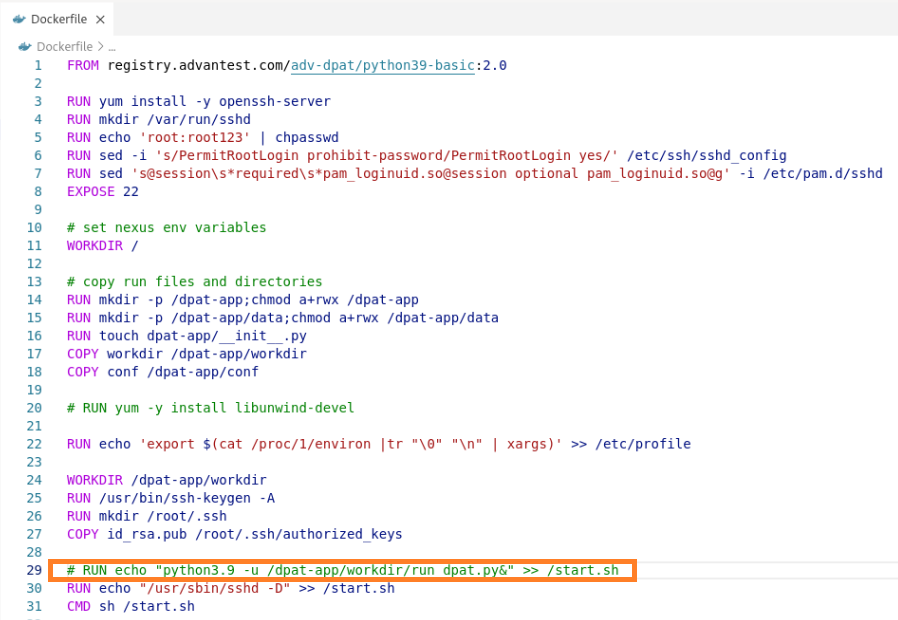
This is the Dockerfile example code.
FROM registry.advantest.com/adv-dpat/python39-basic:2.0

RUN yum install -y openssh-server openssh-clients
RUN mkdir /var/run/sshd
RUN echo 'root:root123' | chpasswd
RUN sed -i 's/PermitRootLogin prohibit-password/PermitRootLogin yes/' /etc/ssh/sshd_config
RUN sed 's@session\s*required\s*pam_loginuid.so@session optional pam_loginuid.so@g' -i /etc/pam.d/sshd
EXPOSE 22

# set nexus env variables
WORKDIR /
RUN python3.9 -m pip install jsonschema debugpy
# copy run files and directories
RUN mkdir -p /dpat-app;chmod a+rwx /dpat-app
RUN mkdir -p /dpat-app/data;chmod a+rwx /dpat-app/data
RUN touch dpat-app/__init__.py
COPY workdir /dpat-app/workdir
COPY conf /dpat-app/conf

# RUN yum -y install libunwind-devel

RUN echo 'export $(cat /proc/1/environ |tr "\0" "\n" | xargs)' >> /etc/profile

ENV LOG_FILE_PATH "/tmp/app.log"
ENV DFF_FLAG="False"
WORKDIR /dpat-app/workdir
RUN /usr/bin/ssh-keygen -A
RUN mkdir /root/.ssh
COPY id_rsa.pub /root/.ssh/authorized_keys

# RUN echo "python3.9 -u /dpat-app/workdir/run_dpat.py&" >> /start.sh
RUN echo "/usr/sbin/sshd -D" >> /start.sh
CMD sh /start.sh
Generate public/private rsa key pair
Note that: The generated public key will be embedded in the DPAT Docker image, while the private key will be used to authenticate to the DPAT container via VSCode Remote SSH.
ssh-keygen -f ~/.ssh/id_rsa -P ""
cp -p ~/.ssh/id_rsa.pub ~/debug_in_docker_container_3.1.0/rd-app_dpat_py
Output:
Generating public/private rsa key pair.
Created directory '/home/xxxx/.ssh'.
Your identification has been saved in /home/xxxx/.ssh/id_rsa
Your public key has been saved in /home/xxxx/.ssh/id_rsa.pub
The key fingerprint is:
SHA256:ZimAw9hmvR8dLvLB/XXIzIZaj9PI3qYu/S20K/ivK4c xxxx@ip-172-173-103-120
The key's randomart image is:
+---[RSA 3072]----+
|                 |
| + o             |
|. B o   .        |
| o . + + o = .   |
|    o * S o B .  |
|     + B = B..   |
|      o .+*.o.   |
|        E.+o+.   |
|         *BO=o.  |
+----[SHA256]-----+
Build docker image and push it to Container Hub
Login Container Hub in the VSCode terminal
docker login registry.advantest.com --username Your_Email --password Your_ContainerHub_Secret
Output:
Username: (Container hub username)
Password: (docker secret in Container hub)
WARNING! Your password will be stored unencrypted in ~/.docker/config.json.
Configure a credential helper to remove this warning. See
https://docs.docker.com/engine/reference/commandline/login/#credentials-store

Login Succeeded
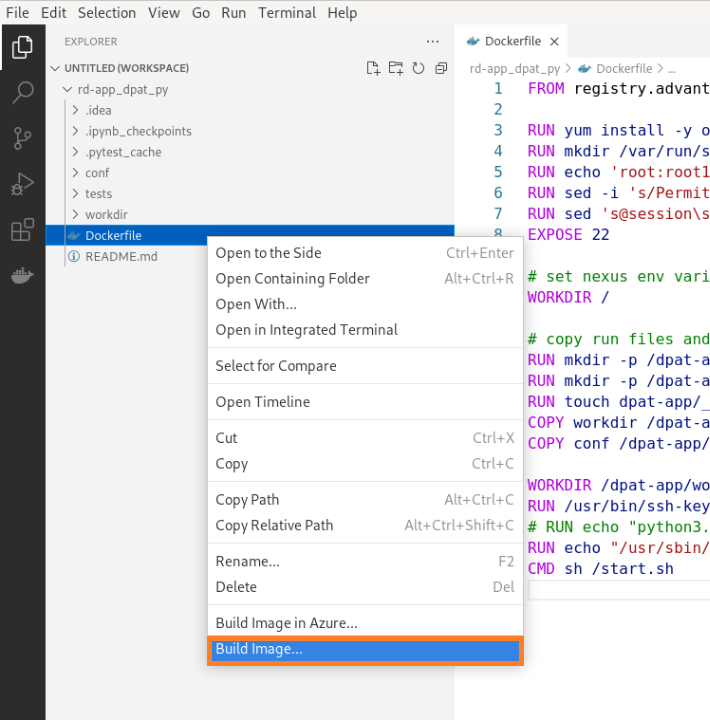
Click “Build Image…” after opening Dockerfile’s context menu in VScode
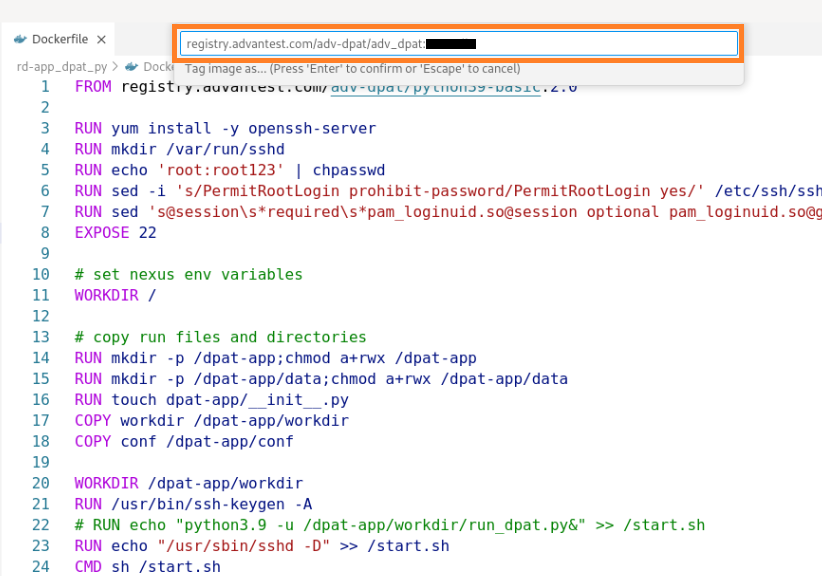
Type the image name and tag, then press “Enter”
registry.advantest.com/adv-dpat/adv-dpat-v1:Image_Tag
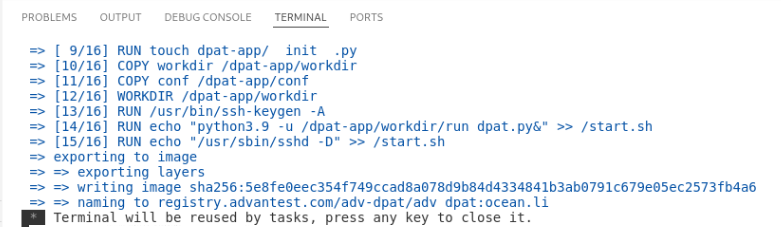
Wait for docker build operation to complete in the terminal, then press any key to close.
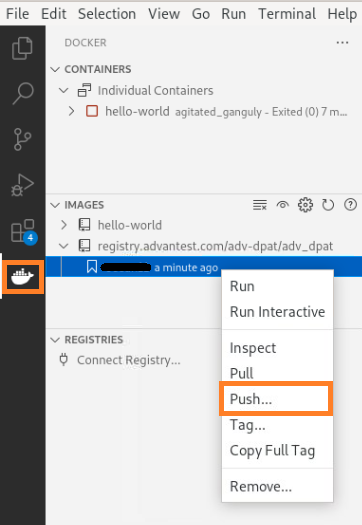
Change to the VSCode docker extension panel, push docker image to Container Hub by selecting image tag in the context menu.
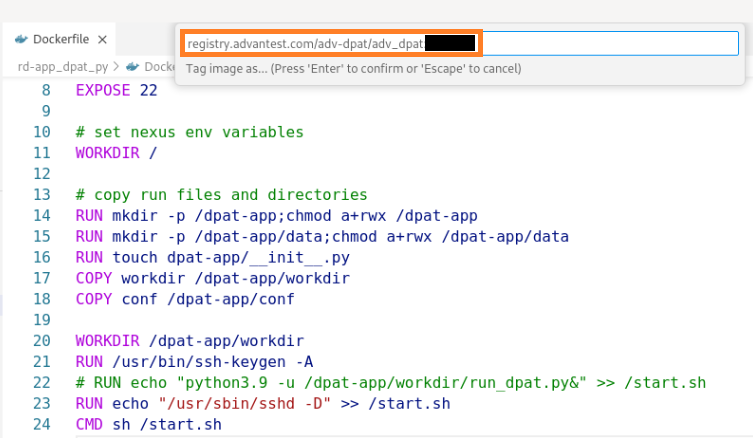
Confirm the image name and tag, press “Enter”
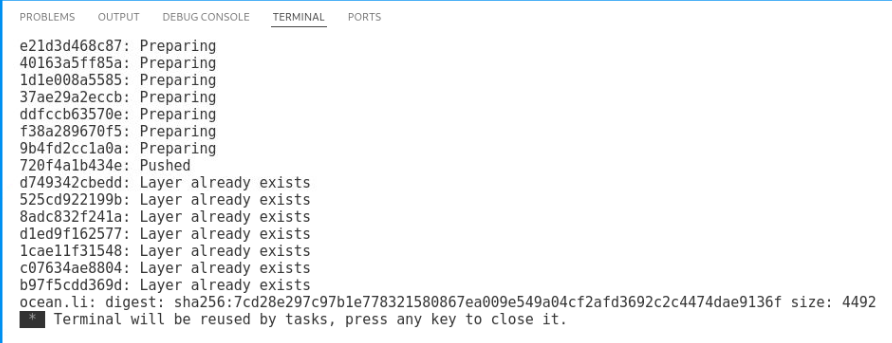
Wait for docker push operation to complete in the terminal, then press any key to close.
Config acs_nexus service in Host Controller VM#
Create image configuration file: /opt/acs/nexus/conf/images.json
{
    "selector": {
        "device_name": "demoRTDI"
    },
    "edge": {
        "address": "ChangeToEdgeIp",
        "registry": {
            "address": "registry.advantest.com",
            "user": "ChangeToUserName",
            "password": "ChangeToSecret"
        },
        "containers": [
            {
                "name": "dpat-app",
                "image": "adv-dpat/adv-dpat-v1:ChangeToImageTag",
                "requirements": {
                    "gpu": false,
                    "mapped_ports": [
                        "8822:22/tcp"
                    ]
                },
                "environment" : {
                    "ONEAPI_DEBUG": "3",
                    "ONEAPI_CONTROL_ZMQ_IP": "ChangeToHostControllerIp"
                }
            }
        ]
    }
}
Edit /opt/acs/nexus/conf/acs_nexus.ini file.
Make sure the Auto_Deploy option is false
[Auto_Deploy]
Enabled=false
Make sure the Auto_Popup option is true
[GUI]
Auto_Popup=true
Auto_Close=true
Restart acs_nexus service to take effect
sudo systemctl restart acs_nexus
Run SmarTest8 test program#
Download the test program if it not exists
Click to download the application-dpat-v3.1.0-RHEL74.tar.gz archive(a simple DPAT algorithm in Python) to your computer.
Note that: If you are using “RHEL79_ST8.7” VM image for running SMT8, you can download the application-dpat-v3.1.0-RHEL79.tar.gz archive, it contains code enhanced SMT8 test method codes.
Transfer the file to the ~/apps directory on the Host Controller VM
Please refer to the “Transferring files” section of VM Management page.
In the VNC GUI, extract files in the bash console.
For RHEL74:
cd ~/apps/
tar -zxf application-dpat-v3.1.0-RHEL74.tar.gz
For RHEL79:
cd ~/apps/
tar -zxf application-dpat-v3.1.0-RHEL79.tar.gz
Start SmarTest8 by the bash script
cd ~/apps/application-dpat-v3.1.0
sh start_smt8.sh
Nexus TPI
You can find “NexusTPI.jar” in the project build path. This dynamic library is used for bi-directional communicating between Test program and Nexus.
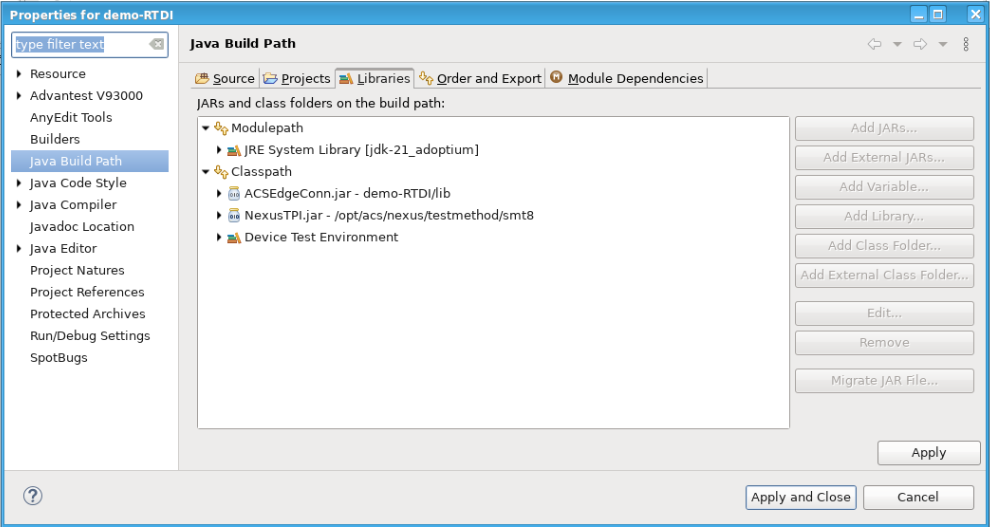
You can find the involking NexusTPI codes in the test method file measuredValueFileReader.java
Click to expand!
/**
*
*/
package misc;

import java.time.Instant;
import java.util.List;
import java.util.Random;

import org.json.JSONObject;

import base.SOCTestBase;
import nexus.tpi.NexusTPI;
import shifter.GlobVars;
import xoc.dta.annotations.In;
import xoc.dta.datalog.IDatalog;
import xoc.dta.datatypes.MultiSiteDouble;
import xoc.dta.measurement.IMeasurement;
import xoc.dta.resultaccess.IPassFail;
import xoc.dta.testdescriptor.IFunctionalTestDescriptor;
import xoc.dta.testdescriptor.IParametricTestDescriptor;


/**
* ACS Variable control and JSON write demo using SMT8 for Washington
*/

@SuppressWarnings("unused")

public class measuredValueFileReader extends SOCTestBase {

    public IMeasurement measurement;
    public IParametricTestDescriptor pTD;
    public IFunctionalTestDescriptor fTD;
    public IFunctionalTestDescriptor testDescriptor;

    class params {
        private String _upper;
        private String _lower;
        private String _unit;

        public params(String _upper, String lower, String _unit) {
            super();
            this._upper = _upper;
            this._lower = lower;
            this._unit = _unit;
        }
    }

    @In
    public String testName;
    String testtext = "";
    String powerResult = "";
    int hb_value;
    double edge_min_value = 0.0;
    double edge_max_value = 0.0;
    double prev_edge_min_value = 0.0;
    double prev_edge_max_value = 0.0;
    boolean c0Flag = false;
    boolean c1Flag = false;
    String[] ecid_strs = {"U6A629_03_x1_y2", "U6A629_03_x1_y3", "U6A629_03_x1_y4", "U6A629_03_x2_y1", "U6A629_03_x2_y2", "U6A629_03_x2_y6", "U6A629_03_x2_y7", "U6A629_03_x3_y10", "U6A629_03_x3_y2", "U6A629_03_x3_y3", "U6A629_03_x3_y7", "U6A629_03_x3_y8", "U6A629_03_x3_y9", "U6A629_03_x4_y11", "U6A629_03_x4_y1", "U6A629_03_x4_y2", "U6A629_03_x4_y4", "U6A629_03_x5_y0", "U6A629_03_x5_y10", "U6A629_03_x5_y11", "U6A629_03_x5_y3", "U6A629_03_x5_y7", "U6A629_03_x5_y8", "U6A629_03_x6_y3", "U6A629_03_x6_y5", "U6A629_03_x6_y6", "U6A629_03_x6_y7", "U6A629_03_x7_y4", "U6A629_03_x7_y7", "U6A629_03_x8_y2", "U6A629_03_x8_y3", "U6A629_03_x8_y5", "U6A629_03_x8_y7", "U6A629_04_x1_y2", "U6A629_04_x2_y2", "U6A629_04_x2_y3", "U6A629_04_x2_y7", "U6A629_04_x2_y8", "U6A629_04_x2_y9", "U6A629_04_x3_y10", "U6A629_04_x3_y2", "U6A629_04_x3_y3", "U6A629_04_x3_y4", "U6A629_04_x3_y5", "U6A629_04_x3_y7", "U6A629_04_x3_y9", "U6A629_04_x4_y11", "U6A629_04_x4_y2", "U6A629_04_x4_y7", "U6A629_04_x4_y8", "U6A629_04_x4_y9", "U6A629_04_x5_y4", "U6A629_04_x5_y7", "U6A629_04_x6_y5", "U6A629_04_x6_y6", "U6A629_04_x6_y8", "U6A629_04_x7_y10", "U6A629_05_x2_y2", "U6A629_05_x3_y0", "U6A629_05_x4_y1", "U6A629_05_x4_y2", "U6A629_05_x5_y1", "U6A629_05_x5_y2", "U6A629_05_x5_y3", "U6A629_05_x6_y1", "U6A629_05_x6_y3", "U6A629_05_x7_y2", "U6A629_05_x7_y3", "U6A629_05_x8_y3", "U6A633_10_x4_y9", "U6A633_10_x8_y9", "U6A633_11_x2_y2", "U6A633_11_x3_y9", "U6A633_11_x5_y2", "U6A633_11_x6_y10", "U6A633_11_x6_y5", "U6A633_11_x7_y9", "U6A633_11_x8_y8", "U6A633_11_x8_y9", "U6A633_12_x2_y3", "U6A633_12_x2_y5", "U6A633_12_x2_y7", "U6A633_12_x2_y9", "U6A633_12_x3_y1", "U6A633_12_x3_y9", "U6A633_12_x4_y0", "U6A633_12_x5_y1", "U6A633_12_x7_y4"};
    int ecid_ptr = 0;
    long hnanosec = 0;
    List<Double> current_values;

    protected IPassFail digResult;
    public String pinList;

    @Override
    public void update() {
    }

    @SuppressWarnings("static-access")
    @Override
    public void execute() {

        int resh;
        int resn;
        int resx;

        IDatalog datalog = context.datalog(); // use in case logDTR does not work

        int index = 0;
        Double raw_value = 0.0;
        String rvalue = "";
        String low_limitStr = "";
        String high_limitStr = "";

        Double low_limit = 0.0;
        Double high_limit = 0.0;
        String unit = "";
        String packetValStr = "";
        String sku_name = "";
        String command = "";

        /**
        * This portion of the code will read an external datalog file in XML and compare data in
        * index 0 to the limit variables received from Nexus
        */
        if (testName.contains("RX_gain_2412_C0_I[1]")) {
            try {
                NexusTPI.target("dpat-app").timeout(1);
                Instant hinstant = Instant.now();
                GlobVars.hsnanoSeconds = (hinstant.getEpochSecond()*1000000000) + hinstant.getNano();
                System.out.println("HealthCheck Start time= "+GlobVars.hsnanoSeconds);

                String jsonHRequest = "{\"health\":\"DoHealthCheck\"}";
                int hres = NexusTPI.request(jsonHRequest);
                System.out.println("BiDir-request Response= "+hres);
                String hresponse = NexusTPI.getResponse();
                System.out.println("BiDir:: getRequest Health Response:"+hresponse);

                Instant instant = Instant.now();
                GlobVars.henanoSeconds = (instant.getEpochSecond()*1000000000) + instant.getNano();
                System.out.println("HealthCheck Stop time= "+GlobVars.henanoSeconds);
                hparse(hresponse);
        } catch (Exception e) {
                e.printStackTrace();
                throw e;
            }
        }

        if ((testName.contains("RX_gain_2412_C0_I[1]")) && (!c0Flag)) {
            try {
                misc.XMLParserforACS.params key = GlobVars.c0_current_params.get(testName);
            } catch (Exception e) {
                System.out.println("Missing entry in maps for this testname : " + testName);
                return;
            }

            try {
                GlobVars.c0_current_values = new XMLParserforACS().parseXMLandReturnRawValues(testName);
            } catch (NullPointerException e) {
                System.out.print("variable has null value, exiting.\n");
            }

            try {
                GlobVars.c0_current_params = new XMLParserforACS().parseXMLandReturnLimitmap(testName);
            } catch (NullPointerException e) {
                System.out.print("variable has null value, exiting.\n");
            }
            c0Flag = true;
            low_limit = Double.parseDouble(GlobVars.c0_current_params.get(testName).getLower());
            high_limit = Double.parseDouble(GlobVars.c0_current_params.get(testName).getUpper());
            unit = GlobVars.c0_current_params.get(testName).getUnit();
            GlobVars.orig_LoLim = low_limit;
            GlobVars.orig_HiLim = high_limit;
        }
        if ((testName.contains("RX_gain_2412_C1_I[1]")) && (!c1Flag)) {
            try {
                misc.XMLParserforACS.params key = GlobVars.c1_current_params.get(testName);
            } catch (Exception e) {
                System.out.println("Missing entry in maps for this testname : " + testName);
                return;
            }

            try {
                GlobVars.c1_current_values = new XMLParserforACS().parseXMLandReturnRawValues(testName);
            } catch (NullPointerException e) {
                System.out.print("variable has null value, exiting.\n");
            }

            try {
                GlobVars.c1_current_params = new XMLParserforACS().parseXMLandReturnLimitmap(testName);
            } catch (NullPointerException e) {
                System.out.print("variable has null value, exiting.\n");
            }
            c1Flag = true;
            low_limit = Double.parseDouble(GlobVars.c1_current_params.get(testName).getLower());
            high_limit = Double.parseDouble(GlobVars.c1_current_params.get(testName).getUpper());
            unit = GlobVars.c1_current_params.get(testName).getUnit();
        }

        if (testName.contains("RX_gain_2412_C1_I[1]")) {
            index = GlobVars.c1_index;
            raw_value = GlobVars.c1_current_values.get(index);
            low_limit = Double.parseDouble(GlobVars.c1_current_params.get(testName).getLower());
            high_limit = Double.parseDouble(GlobVars.c1_current_params.get(testName).getUpper());
            unit = GlobVars.c1_current_params.get(testName).getUnit();
        }
        if (testName.contains("RX_gain_2412_C0_I[1]")) {
            index = GlobVars.c0_index;
            raw_value = GlobVars.c0_current_values.get(index);
            low_limit = Double.parseDouble(GlobVars.c0_current_params.get(testName).getLower());
            high_limit = Double.parseDouble(GlobVars.c0_current_params.get(testName).getUpper());
            unit = GlobVars.c0_current_params.get(testName).getUnit();
        }

        if (testName.contains("RX_gain_2412_C0_I[1]")) {
            int res;
            try {
                System.out.println("ECID["+ecid_ptr+"] = "+ecid_strs[ecid_ptr]);
                packetValStr = buildPacketString();

                rvalue = String.valueOf(raw_value);
                low_limitStr = String.valueOf(low_limit);
                high_limitStr = String.valueOf(high_limit);

                sku_name = "{\"SKU_NAME\":{\"MSFT_ECID\":\""+ecid_strs[ecid_ptr]+"\",\"testname\":\""+testName+"\",\"RawValue\":\""+rvalue+"\",\"LowLim\":\""+low_limitStr+"\",\"HighLim\":\""+high_limitStr+"\",\"packetString\":\""+packetValStr+"\"}}";
                System.out.println("\nJson String sku_name length= "+sku_name.length());

                Instant instant = Instant.now();
                GlobVars.ssnanoSeconds = (instant.getEpochSecond()*1000000000) + instant.getNano();
                System.out.println("TPSend Start Time= "+GlobVars.ssnanoSeconds);

                res = NexusTPI.send(sku_name);

                Instant pinstant = Instant.now();
                GlobVars.senanoSeconds = (pinstant.getEpochSecond()*1000000000) + pinstant.getNano();
                System.out.println("TPSend Return Time= "+GlobVars.senanoSeconds);
            } catch (Exception e) {
                e.printStackTrace();
                throw e;
            }

            try {
                long millis = 200;
                Thread.sleep(millis);
            } catch (InterruptedException e1) {
                e1.printStackTrace();
            }

            try {
                Instant ginstant = Instant.now();
                GlobVars.rsnanoSeconds = (ginstant.getEpochSecond()*1000000000) + ginstant.getNano();
                System.out.println("RqstHostTime TPRqst Start= "+GlobVars.rsnanoSeconds);

                String jsonRequest = "{\"request\":\"CalcNewLimits\"}";

                res = NexusTPI.request(jsonRequest);
                System.out.println("BiDir-request Response= "+res);
                String response = NexusTPI.getResponse();
                System.out.println("BiDir-getRequest Response= "+response);

                Instant rinstant = Instant.now();
                GlobVars.renanoSeconds = (rinstant.getEpochSecond()*1000000000) + rinstant.getNano();
                System.out.println("Request Return Time= "+GlobVars.renanoSeconds);
                parse(response);
            } catch (Exception e) {
                e.printStackTrace();
                throw e;
            }

        }
        if ((testName.contains("RX_gain_2412_C0_I[1]")) && (!GlobVars.limFlag)) {
            low_limit = Double.parseDouble(GlobVars.adjlolimStr);
            high_limit = Double.parseDouble(GlobVars.adjhilimStr);
        }
        System.out.println(testName + ": TestingText= " + testtext);
        System.out.println(testName + ": low_limit= " + low_limit);
        System.out.println(testName + ": high_limit= " + high_limit);

        System.out.println("Simulated Test Value Data ");
        System.out.println(
                "testname = " + testName + "  lower = " + low_limit + "  upper = " + high_limit
                        + " units = " + unit + " raw_value = " + raw_value + " index = " + index);

        MultiSiteDouble rawResult = new MultiSiteDouble();
        for (int site : context.getActiveSites()) {
            rawResult.set(site, raw_value);
        }
        /** This performs datalog limit evaluation and p/f result and EDL datalogging */

        pTD.setHighLimit(high_limit);
        pTD.setLowLimit(low_limit);
        pTD.evaluate(rawResult);

        if (testName.contains("RX_gain_2412_C0_I[1]")) {
            if (GlobVars.c0_index < (GlobVars.c0_current_values.size() - 1)) {
                GlobVars.c0_index++;
            } else {
                GlobVars.c0_index = 0;
            }
        }
        if (testName.contains("RX_gain_2412_C1_I[1]")) {
            if (GlobVars.c1_index < (GlobVars.c1_current_values.size() - 1)) {
                GlobVars.c1_index++;
            } else {
                GlobVars.c1_index = 0;
            }
        }

        if (pTD.getPassFail().get()) {
            System.out.println(
                    "Sim Value Test " + testName + "\n************ PASSED **************\n");
        } else {
            System.out.println(testName + "\n************ FAILED *****************\n");
        }

        if (testName.contains("RX_gain_2412_C0_I[1]")) {
            // HTTP performance data: HealthCheck, POST, GET transactions
            System.out.println("************ Nexus BiDir Performance Data ******************");
            System.out.println("HealthCheck: Host to App Time= "+GlobVars.perf_times.get("Health_h-a_time"));
            System.out.println("HealthCheck: App to Host Time= "+GlobVars.perf_times.get("Health_a-h_time"));
            System.out.println("HealthCheck: Round-Trip Time= "+GlobVars.perf_times.get("Health_rtd_time"));

            System.out.println("TPSend: Host to App Time= "+GlobVars.perf_times.get("Send_h-a_time"));
            System.out.println("TPSend: App to Host Time= "+GlobVars.perf_times.get("Send_a-h_time"));
            System.out.println("TPSend: Round-Trip Time= "+GlobVars.perf_times.get("Send_rtd_time"));

            System.out.println("TPRequest: Host to App Time= "+GlobVars.perf_times.get("Request_h-a_time"));
            System.out.println("TPRequest: App to Host Time= "+GlobVars.perf_times.get("Request_a-h_time"));
            System.out.println("TPRequest: Round-Trip Time= "+GlobVars.perf_times.get("Request_rtd_time"));
            System.out.println("*****************************************************");
        }

        // Clear large strings used for http post
        packetValStr = "";
        sku_name = "";

        ecid_ptr++;
        if (ecid_ptr >= ecid_strs.length) {
            ecid_ptr = 0;
        }
    }

    public static String parse(String responseBody) {
        if (responseBody.contains("MSFT_ECID")) {
            JSONObject results = new JSONObject(responseBody);
            String ecid = results.getString("MSFT_ECID");
            System.out.println("MSFT_ECID: " + ecid);
            String testName = results.getString("testname");
            System.out.println("testname: " + testName);
            GlobVars.adjlolimStr = results.getString("AdjLoLim");
            System.out.println("AdjLoLim: " + GlobVars.adjlolimStr);
            GlobVars.adjhilimStr = results.getString("AdjHiLim");
            System.out.println("AdjHiLim: " + GlobVars.adjhilimStr);
            String sndappTime = results.getString("SendAppTime");
            System.out.println("SendAppTime: " + sndappTime);
            String sretappTime = results.getString("SendAppRetTime");
            System.out.println("SendAppRetTime: " + sretappTime);
            String rappTime = results.getString("RqstAppTime");
            System.out.println("RqstAppTime: " + rappTime);
            String rretappTime = results.getString("RqstAppRetTime");
            System.out.println("RqstAppRetTime: " + rretappTime);

            long atime = Long.parseLong(sndappTime);
            long artime = Long.parseLong(sretappTime);
            long ratime = Long.parseLong(rappTime);
            long rartime = Long.parseLong(rretappTime);

            double deltaSndTime = (atime - GlobVars.ssnanoSeconds)/1000000.0; // Delta time in msec
            GlobVars.perf_times.put("Send_h-a_time", deltaSndTime);
            System.out.println("Delta TPSend h-a app-host time: "+deltaSndTime+" msec");
            double deltaSndRetTime = (GlobVars.senanoSeconds - artime)/1000000.0; // Delta time in msec
            GlobVars.perf_times.put("Send_a-h_time", deltaSndRetTime);
            System.out.println("Delta TPSend a-h time: "+deltaSndRetTime+" msec");
            double sendDeltaTime = (GlobVars.senanoSeconds - GlobVars.ssnanoSeconds)/1000000.0; // Delta time in msec
            GlobVars.perf_times.put("Send_rtd_time", sendDeltaTime);
            System.out.println("Delta TPSend transaction time: "+sendDeltaTime+" msec");

            double deltaRqstTime = (ratime - GlobVars.rsnanoSeconds)/1000000.0; // Delta time in msec
            GlobVars.perf_times.put("Request_h-a_time", deltaRqstTime);
            System.out.println("Delta TPRequest h-a time: "+deltaRqstTime+" msec");
            double deltaRqstRetTime = (GlobVars.renanoSeconds - rartime)/1000000.0; // Delta time in msec
            GlobVars.perf_times.put("Request_a-h_time", deltaRqstRetTime);
            System.out.println("Delta TPRequest a-h time: "+deltaRqstRetTime+" msec");
            double gadeltaTime = (GlobVars.renanoSeconds - GlobVars.rsnanoSeconds)/1000000.0; // Delta time in msec
            GlobVars.perf_times.put("Request_rtd_time", gadeltaTime);
            // GlobVars.rsnanoSeconds = 0; // clear for next device
        }
        return responseBody;
    }

    public static String hparse(String responseBody) {
        String hatime = "0";
        if (responseBody.contains("health")) {
            JSONObject results = new JSONObject(responseBody);
            hatime = results.getString("health");
            long hatimeval = Long.parseLong(hatime);
            System.out.println("health: " + hatime);

            double hsdeltaTime = (hatimeval - GlobVars.hsnanoSeconds)/1000000.0; // Delta time in msec
            double hrdeltaTime = (GlobVars.henanoSeconds  - hatimeval)/1000000.0; // Delta time in msec
            double rhdeltaTime = (GlobVars.henanoSeconds  - GlobVars.hsnanoSeconds)/1000000.0; // Delta time in msec

            GlobVars.perf_times.put("Health_h-a_time", hsdeltaTime);
            GlobVars.perf_times.put("Health_a-h_time", hrdeltaTime);
            GlobVars.perf_times.put("Health_rtd_time", rhdeltaTime);
            System.out.println("Delta health h-a time: "+hsdeltaTime+" msec");
            System.out.println("Delta health a-h time: "+hrdeltaTime+" msec");
            System.out.println("Delta health rtd time: "+rhdeltaTime+" msec");
        }

        return hatime;
    }

    public String buildPacketString() {
        int packetSel = GlobVars.packetSelector;
        int[] cnt_values = { 203, 1000, 10000, 100000, 1000000,
                2000000, 3000000, 4000000, 5000000,
                6000000, 7000000, 8000000, 9000000,
                10000000, 20000000, 40000000, 60000000, 80000000, 100000000,
                120000000, 140000000, 160000000, 180000000, 200000000, 220000000,
                240000000, 260000000, 280000000, 300000000};
        System.out.println("PacketID: " + packetSel);
        String pktStr = "";
        int chrcnt = cnt_values[packetSel] - 200; // was 146;
        System.out.println("Chrcnt: " + chrcnt);
        String valstr = "";

        String BUILDCHARS = "ABCDEFGHIJKLMNOPQRSTUVWXYZ1234567890";
        StringBuilder packetstr = new StringBuilder();
        Random rnd = new Random();
        while (packetstr.length() < chrcnt) { // length of the random string.
            int index = (int) (rnd.nextFloat() * BUILDCHARS.length());
            packetstr.append(BUILDCHARS.charAt(index));
        }
        pktStr = packetstr.toString();
        GlobVars.packetStr = pktStr;

        return pktStr;
    }

}
Activate Testflow:
To activate the Testflow, you’ll need to right-click on the Testflow entry at the bottom and then select “Activate…”:
Note: In Redhat 7.9, it is the “Activate and Reset Test Program”
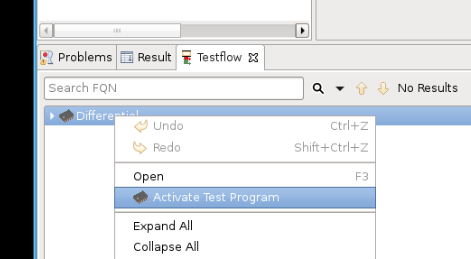
Trigger DPAT app starting on Edge by TCCT
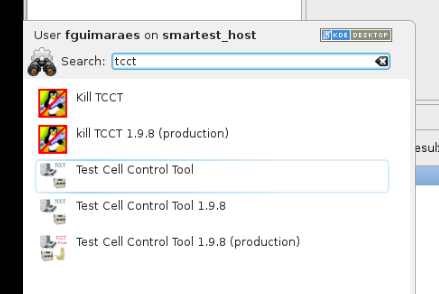
From the Red Hat menu, open TCCT:
Click on “Select Test Program”, select the “Differential” testflow and then “OK”:
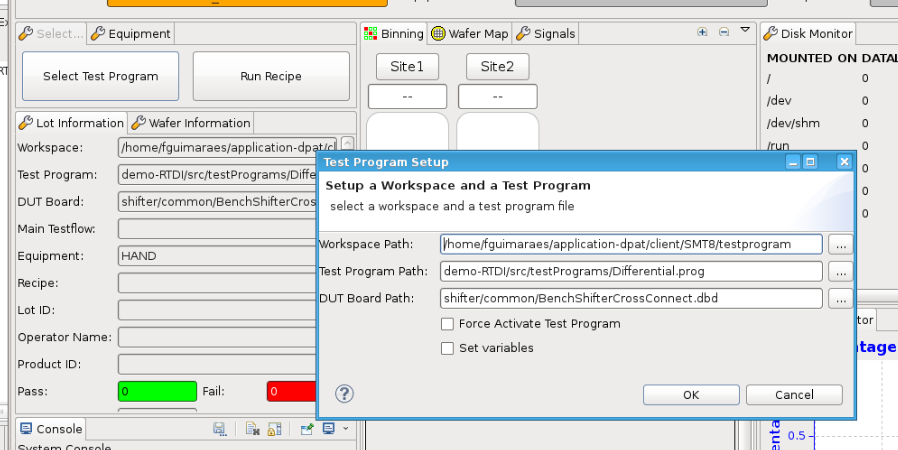
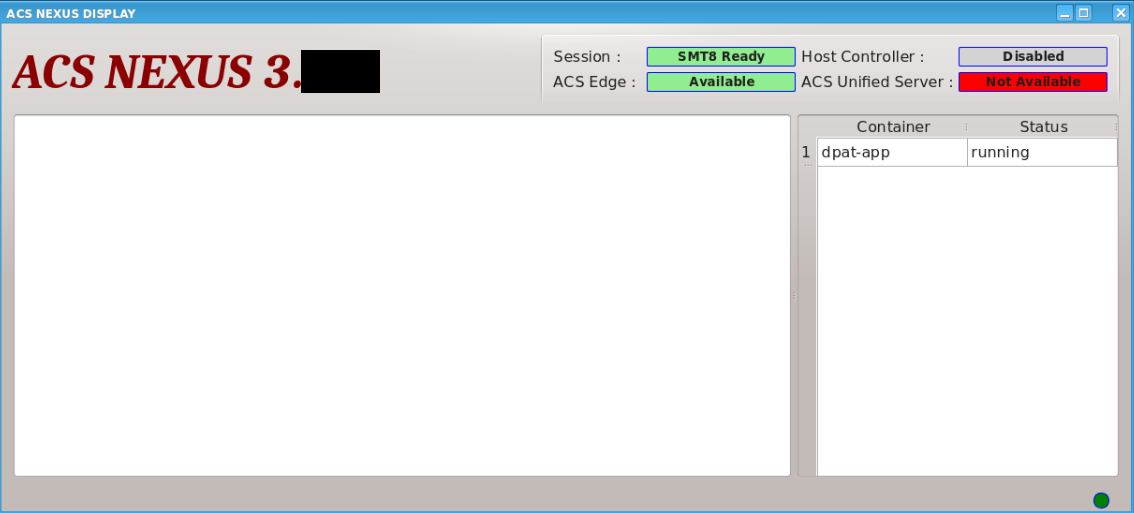
By running TCCT (just selecting the testprogram), an event is triggered and the DPAT container automatically starts running on the ACS Edge Server.
Remote debug running container from VSCode#
SSH login to running docker container#
Note: If you encountered this error:
“Error: Remote host key has changed, port forwarding is disabled”
Please execute the following command then try again:
echo > /home/$USER/.ssh/known_hosts
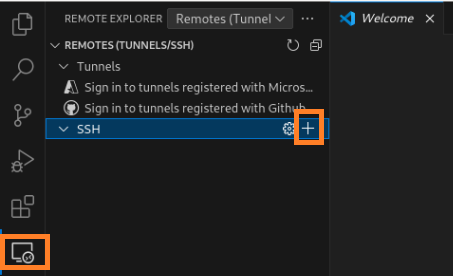
Click “+” in the REMOTE EXPLORER extension page.
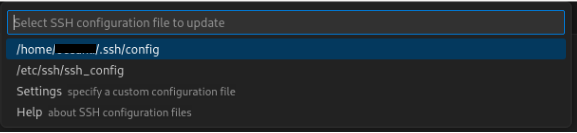
Type “ssh root@<edge server IP>:8822” to connect to the docker container on the edge server.

Press “Enter” to confirm
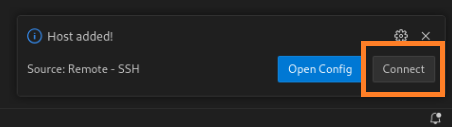
Click on the “Connect” button after this dialog pops up from the bottom right.
Click “Continue” in the fingerprint confirm dialog
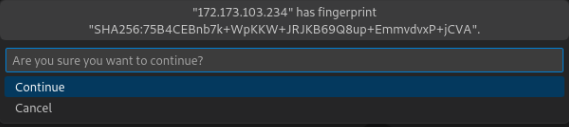
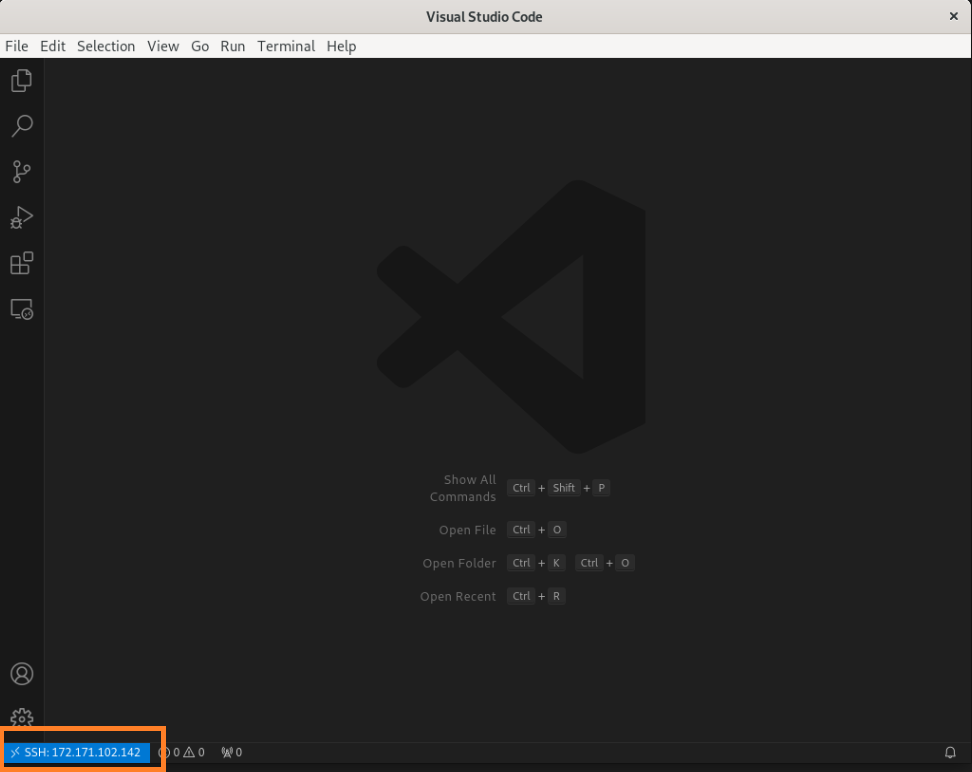
Wait for the remote setup to be automatically ready, you can see you have connected to the remote docker container by ssh
Debug container in VSCode#
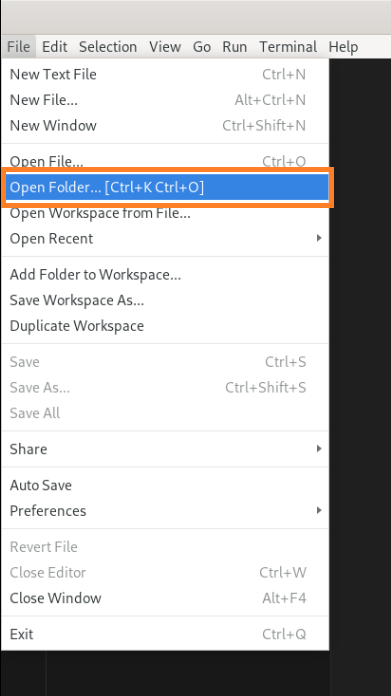
Click on “Open Folder” in the “File” menu.
Select “/dpat-app/workdir” folder, then click “OK” button
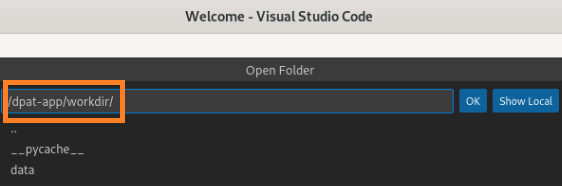
Now, you can see files in the remote docker container. Open “run_dpat.py”, which is the main entry point for the DPAT App.
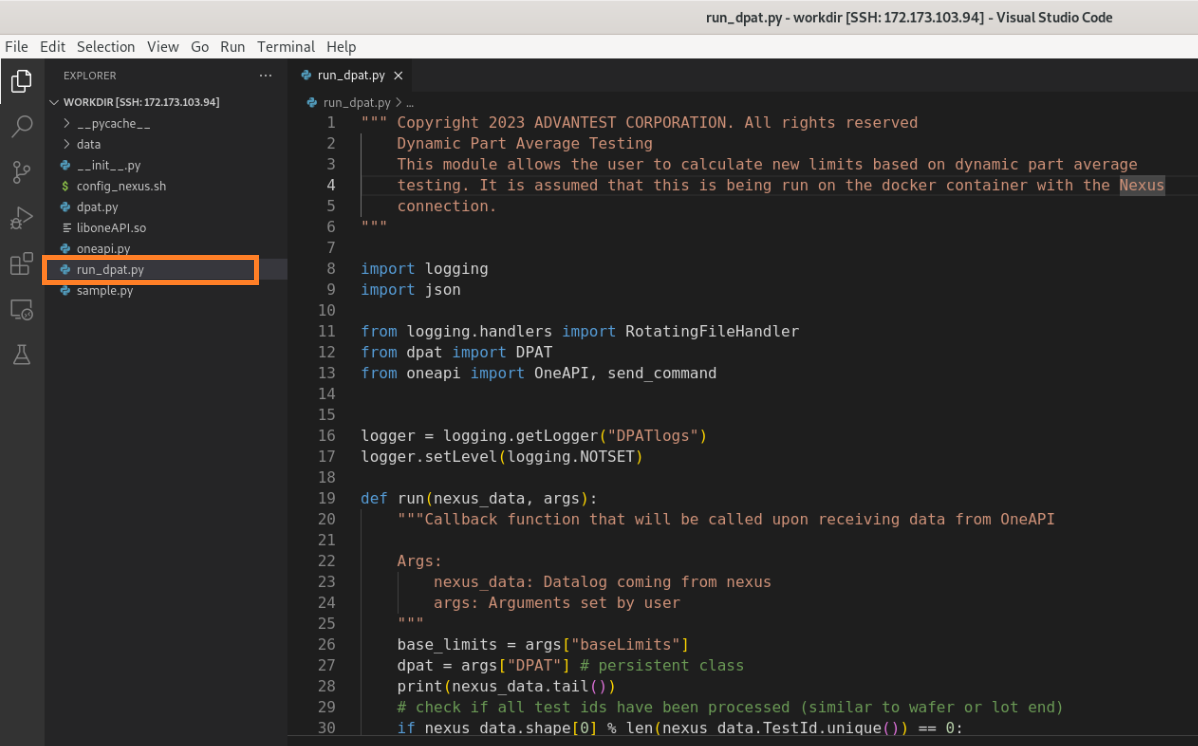
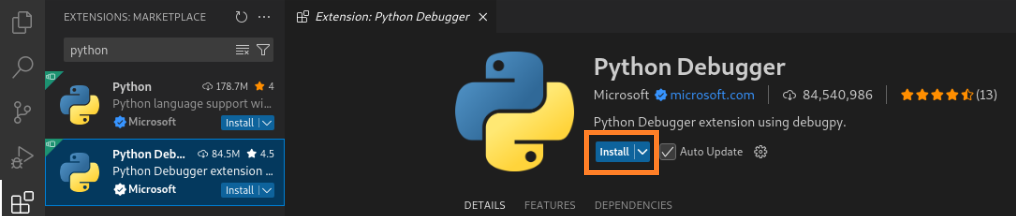
Install “Python Debugger” extension on remote VSCode IDE
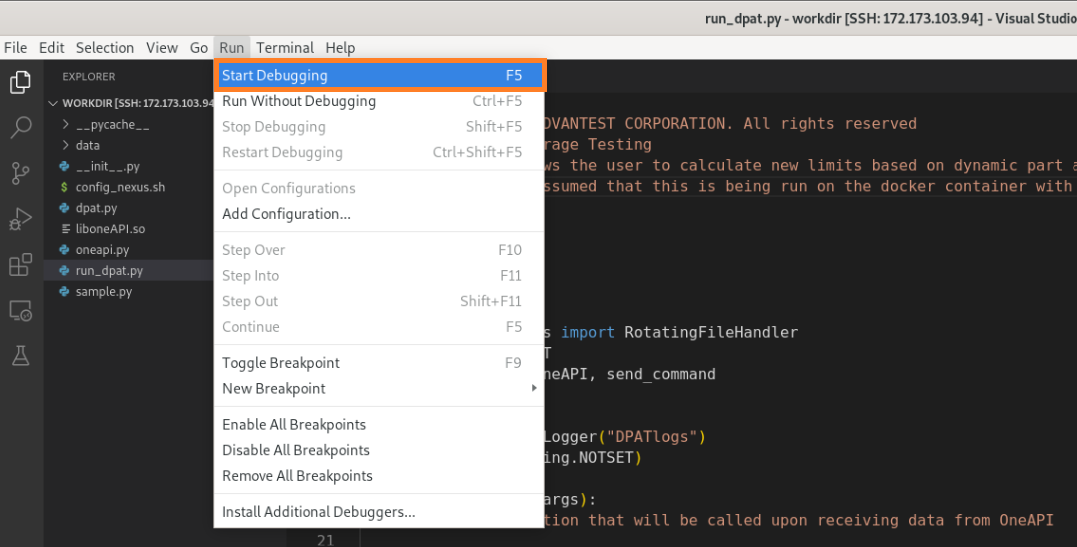
Click on “Start Debugging” in “Run” menu.
Select “Python Debugger” then select “Python File” in the popped up dialog.
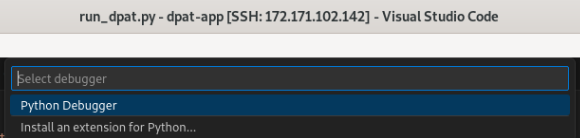
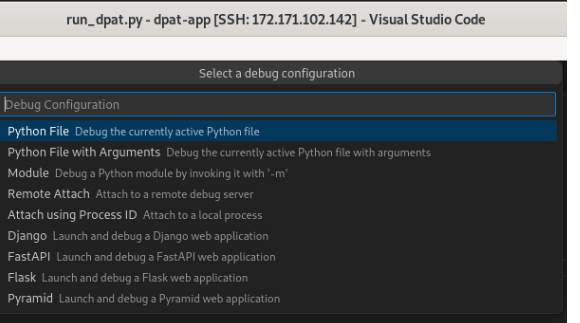
Then you can see the run_dpat.py is started in the terminal

Run Test Program on the Host Controller to invoke DPAT app#
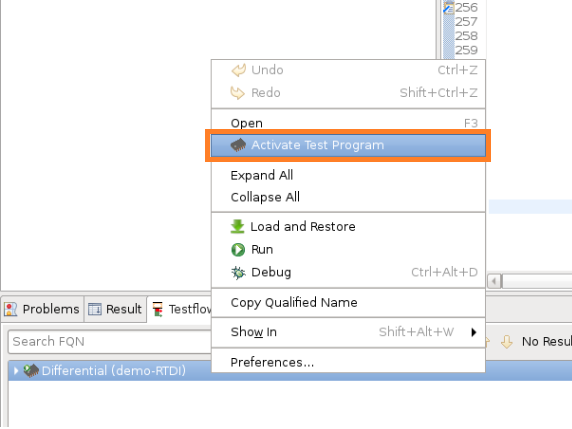
In test flow view, right-click “Differential(demo-RTDI)” testflow, then click “Activate Test Program”
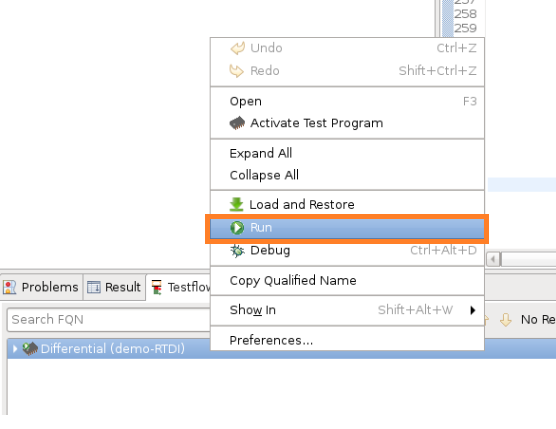
right-click “Differential(demo-RTDI)” testflow, then click “Run” to run the testflow
Back to Ubuntu Server, check VS code output log:
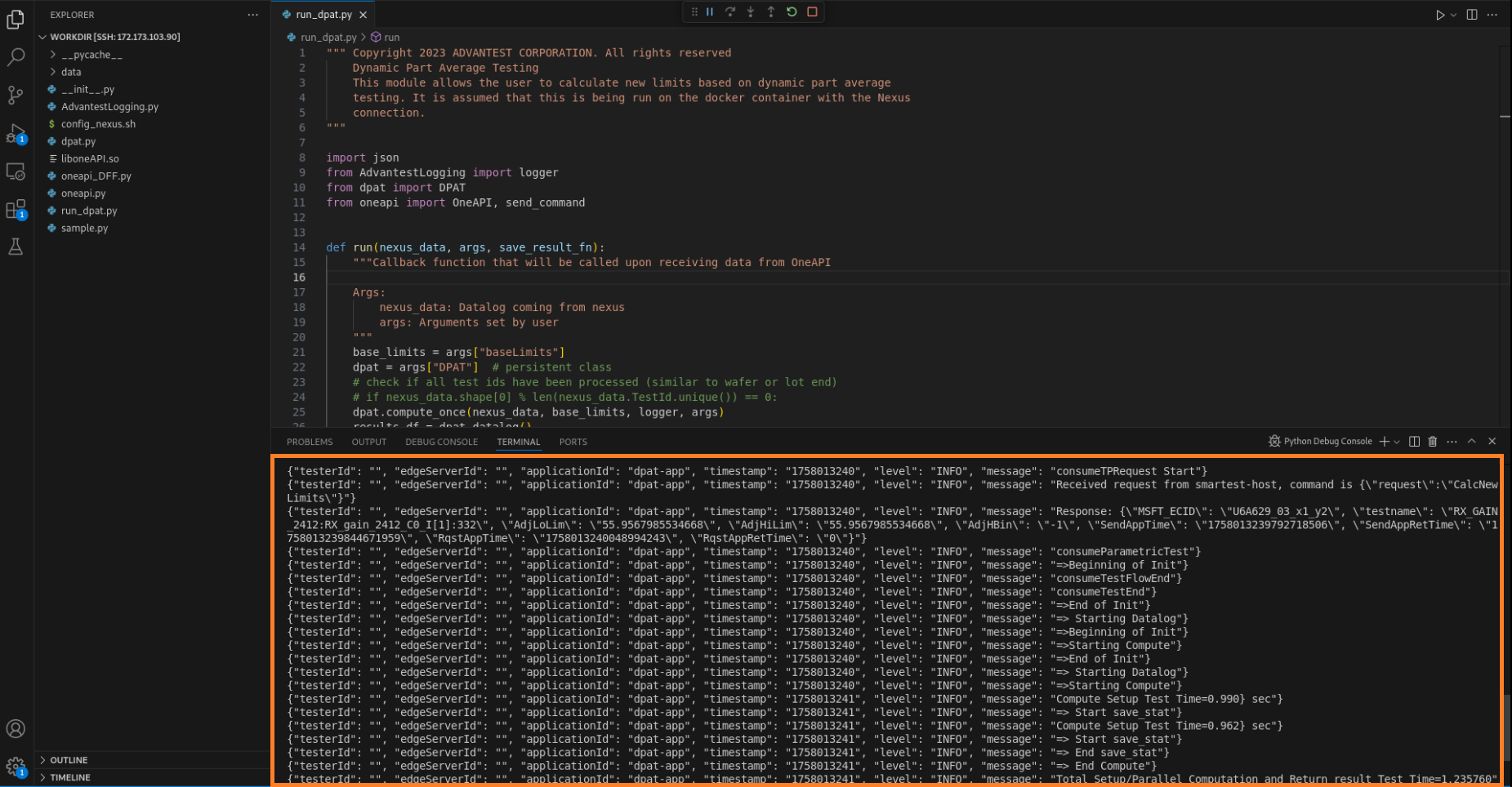
While the DPAT test program is running, you can see the DPAT logs continuously output in VS Code console.
Besides, you can “Toggle Breakpoint” on any code line wherever you are interested to run the DPAT line by line while DPAT test program is running.